
The calendar fills before you plan it. By 9am on Monday there is already a client call, a team check-in, an email thread that needs a response, and something from the weekend that did not get resolved. By Tuesday the week has a shape you did not choose.
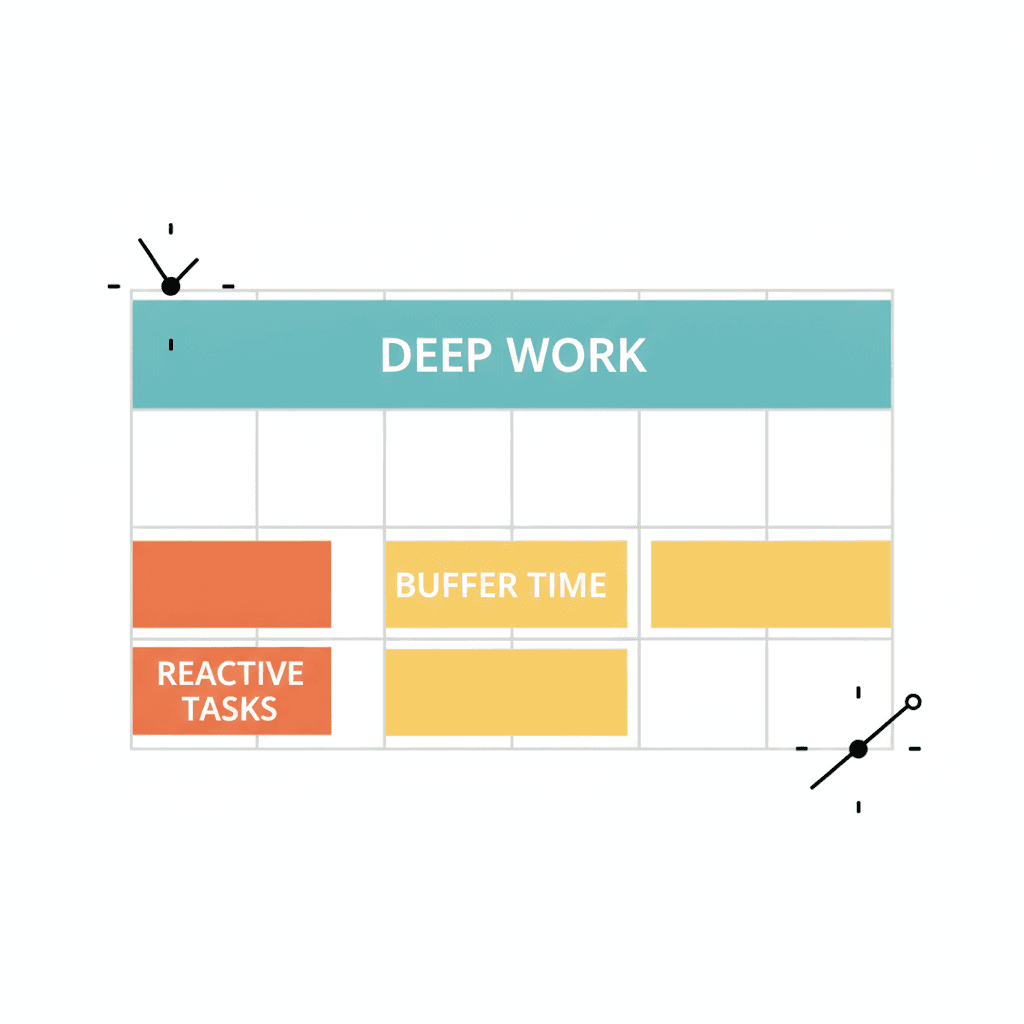
Time blocking is the practice of scheduling specific types of work into dedicated calendar slots before the reactive work lands. The logic is straightforward: if you do not put deep work on the calendar, something else takes the slot. You do not manage time by reacting to it — you manage it by deciding in advance.
For business owners, this is the difference between the week they have and the week they planned.
What Is Time Blocking?
Time blocking is a scheduling method where you assign specific types of work to fixed time slots on your calendar, rather than working from a to-do list. You block two or three hours for strategic deep work, a window for email and calls, a slot for admin — and you protect those blocks the same way you would protect a meeting with an important client.
The method draws on Cal Newport’s research into deep work and sits inside the Do phase of the NP System — the final step after you have captured, processed, and planned. You block the time to protect what you already know matters.
Why Business Owners Need It More Than Most
An employee’s day carries structure imposed from outside: meetings scheduled by others, tasks set by a manager, a team rhythm that creates natural anchors. That structure is often frustrating, but it exists.
A business owner’s day has none of those guardrails. You are the one deciding what deserves time, and everything feels urgent. Client calls, proposal writing, financial review, team conversations, strategic planning — all of it is theoretically your job, none of it has an obvious priority, and reactive work expands to fill every available hour.
The most common form of overwhelm for business owners is not too much work. It is too many simultaneous priorities with no structure for deciding which one gets today. Time blocking creates that structure. The calendar becomes a decision, not a suggestion box.
How to Time Block Your Day: A Three-Part Method
Most people who try time blocking fail because they block too many things, block the wrong things, or ignore the blocks the moment something more urgent appears. The method below is deliberately simple.
1. Block your deep work first
Before anything else goes on the calendar, protect a two-to-three-hour block for your most important strategic work. This block goes first — in the morning, before client calls or internal meetings. If the morning is already claimed, use the first genuinely clear slot of the day. The key is that it is non-negotiable, treated with the same seriousness as a commitment to a client.
This connects directly to the 3-3-3 rule: three hours of deep work as the first and largest block. You know the ratio before the day starts, which means the decision is made the night before rather than at 9am when everything is already competing for attention.
2. Batch the reactive work
Email, messages, and quick admin do not disappear, but they do not need continuous attention either. Two or three fixed response windows are sufficient: one mid-morning, one mid-afternoon. Outside those windows, the inbox stays closed.
This is harder than it sounds because the pull of a new message is real. But every time you respond outside your batched window, you pay an attention tax: fifteen to twenty minutes of recovery before you can return to complex thinking. Batching is not about ignoring things — it is about choosing when they get your full attention rather than a fragment of it.
The 5 Ds triage method works best when it runs inside a batched window rather than as a continuous background process. One decision sweep, then back to the real work.
3. Build deliberate buffer
The single biggest time-blocking mistake is a calendar with no margin. Every block pressed tight against the next, no room for the thing that always appears at 2pm and takes thirty minutes to resolve. When the schedule has no slack, one disruption unravels the whole day.
Build buffer deliberately: thirty minutes after the deep work block, genuine gaps between client calls, fifteen minutes before the end of the day to close open loops and set tomorrow’s rocks. Buffer is not wasted time — it is the capacity that absorbs real life without destroying the plan.
Time Blocking Only Works on Top of a Planning Habit
Time blocking is a scheduling technique, not a priority system. If you block time without first knowing what your most important work is, the block fills with whatever feels easiest. You end up with a structured calendar and the wrong work in it.
The week starts with a weekly review: a thirty-minute session where you assess the previous week, review your goals, and identify the three rocks for the coming days. Those rocks are what go into the deep work blocks. The calendar is where the rocks get done — it is not where you decide what the rocks are.
This is the sequence in the productivity framework built for entrepreneurs: capture → process → plan → do. Time blocking sits at the Do stage. The Plan stage is what tells it what to protect.
Without that planning foundation, time blocking is just a better-looking to-do list. The calendar looks organised; the strategic work still slips to next week.
Common Mistakes That Make Time Blocking Fail
Blocking too many types of work. A calendar with twelve different block categories takes more energy to maintain than the work itself. Keep it to three or four types: deep work, reactive work, meetings, buffer.
Not making it visible to others. A blocked morning only works if clients and team members know when you are available. The block needs to show as unavailable in your shared calendar, or it will get scheduled over without anyone realising.
Treating blocks as aspirational. A block is not a reminder — it is a commitment. If you consistently skip the deep work block because something more urgent appeared, the block was not protecting the right work, or the planning habit behind it is not yet running properly.
The fix for the last mistake is almost always upstream: sharpen the daily processing habit so that what lands in the deep work block is genuinely the most important thing, not just the first thing that came to mind.
Frequently Asked Questions
What is time blocking? Time blocking is a scheduling method where you assign specific types of work to fixed calendar slots in advance, rather than working from a to-do list. You decide which hours belong to deep work, which to reactive tasks, and which carry buffer for the unexpected — and those decisions are made before the day begins.
Does time blocking work for business owners? Yes, particularly because business owners have no external structure imposed on their day. Time blocking works by forcing a priority decision before the day starts — which matters more for owners, who have no manager or team rhythm to anchor the day for them.
How long should a deep work block be? Two to three hours is the practical ceiling for most people. Shorter than two hours rarely produces real depth; longer than three hours tends to produce diminishing returns. The 3-3-3 rule puts the sustainable block at three hours.
What should I put in my time blocks? Start with one type of work: the most important strategic task for the week. Once that block is protected, add a batched window for email and messages, and buffer slots for the unexpected. Keep the number of block types to three or four at most.
Why does time blocking fail? Time blocking usually fails when it is used without a planning habit behind it. If you have not decided your priorities before you block the time, the blocks fill with whatever feels easiest. The blocking works when it follows from a weekly review and a clear sense of what the week’s most important work actually is.
The Next Step
Time blocking works when it is built on top of a system. The system decides what matters. The calendar protects the time to do it. Without both, the week keeps running on whatever arrived in the inbox first.
If the deep work keeps getting pushed — if the week disappears into reactive admin despite good intentions — the planning layer is missing. The NP System builds that layer: a framework connecting goals to weekly rocks to daily blocks. The free online course covers the whole system across eleven modules at nerdproductivity.com/productivity-system.
For further reading, see the guide on how to prioritise your growth actions.
